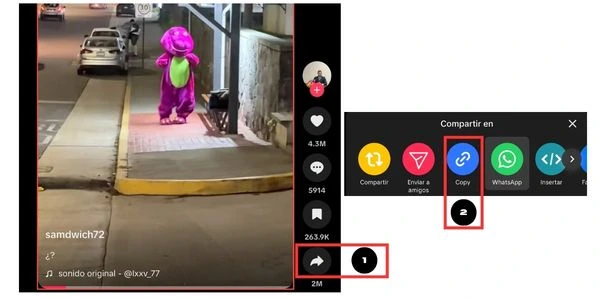
Step 1: Copy the TikTok video link
On PC, Mac, iPhone, or Android, open TikTok and find the video you want to save. Then tap Share and choose Copy link. This is the key step so Clipnexo can detect the video and show the preview and download options.
How do you download TikTok videos? If you want a simple, fast, and safe way to save your favorite videos, Clipnexo lets you download TikTok videos without watermark, free, online, and without installing software. It works on iPhone, Android, Windows, and Mac.
This step-by-step guide is designed for beginner and intermediate users who want to save public TikTok videos using a practical tool. If you prefer to go straight to the downloader, you can use it here: Download TikTok videos.
On PC, Mac, iPhone, or Android, open TikTok and find the video you want to save. Then tap Share and choose Copy link. This is the key step so Clipnexo can detect the video and show the preview and download options.
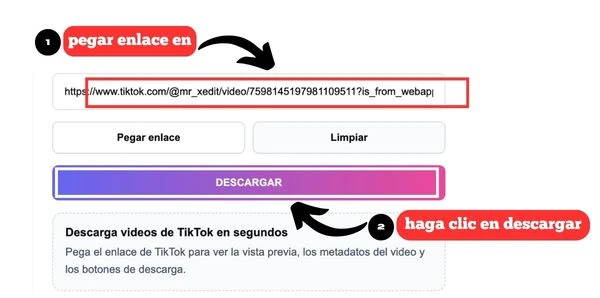
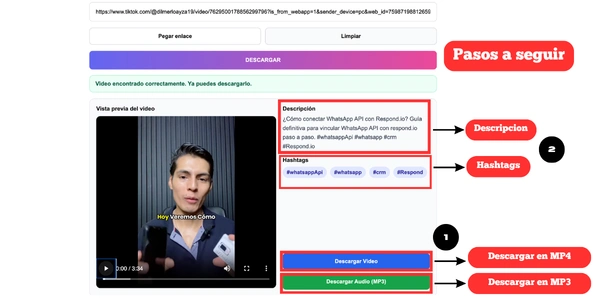
Go to Clipnexo.com, paste the copied link into the search box, and press Download. The tool will process the content to show the video, description, hashtags, and download buttons. If you want only the audio, you can then use the MP3 option.
Once the result is ready, press Download Video to save the MP4 file or use the MP3 option if you only need the audio. That is how simple it is to download TikTok videos with Clipnexo from your phone or computer.
If you get an error or cannot find the video, the content may be private, deleted, or restricted in some countries. If you find an issue while using the tool, contact us at hola@clipnexo.com.
Yes. Clipnexo processes public TikTok links and lets you download videos without watermark quickly and online.
Copy the video link, paste it into Clipnexo, and press download. The process works on iPhone, Android, and PC.
Yes. You can use Clipnexo for free to download TikTok videos and convert content to MP3.
Yes. You can use the TikTok to MP3 tool to save only the audio when you do not need the full video file.
This usually happens when the video is private, deleted, or restricted by region.
Yes. Clipnexo works in the US and other countries as long as the TikTok link is public.